


Location: Home > Apps > Tools > Ultraviolet icon pack

Ultraviolet Icon Pack (Premium Icon Collection Unlocked, Premium Wallpaper Gallery Unlocked, Dynamic Calendar Unlocked, All Icon Masking Styles Unlocked, Cloud Request System Unlocked, Ads Disabled) Download for Android

Ultraviolet Icon Pack icon

Ultraviolet Icon Pack Premium Icon Collection Unlocked, Premium Wallpaper Gallery Unlocked, Dynamic Calendar Unlocked, All Icon Masking Styles Unlocked, Cloud Request System Unlocked, Ads Disabled

5.0
v16.0.1 for Android
Fast Download:Download this app by playmods App with faster speed.

Ultraviolet Icon Pack MOD Info MOD Info :
Premium Icon Collection Unlocked, Premium Wallpaper Gallery Unlocked, Dynamic Calendar Unlocked, All Icon Masking Styles Unlocked, Cloud Request System Unlocked, Ads Disabled

Screenshots

Description

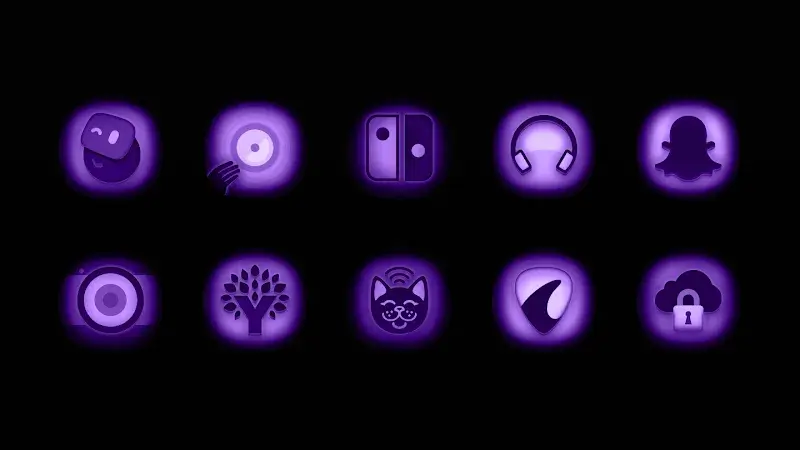
Ultraviolet Icon Pack Mod is a personalization tool for Android that replaces system and app icons with a curated set of purple and ultraviolet-themed elliptical designs. It targets users seeking a cohesive, monochromatic aesthetic for their home screens, functioning within the broader category of launcher customization utilities. The pack includes dynamic calendar icons and wallpapers, with integration for popular launchers like Nova, Action, and Apex.

What This Mod Unlocks

  • Full Premium Icon Collection Unlocked: All 5000+ icons are available without the in-app purchase requirement.
  • Premium Wallpaper Gallery Unlocked: The entire high-resolution wallpaper set is accessible.
  • Dynamic Calendar Feature Unlocked: Daily updating calendar icons function without license check.
  • All Icon Masking Styles Unlocked: Includes OnePlus, Pixel, Samsung, and LG system style alternatives.
  • Cloud-Based Icon Request System Unlocked: Users can submit requests for unsupported apps.
  • Advertisements Removed: All banner and interstitial ad modules are disabled.

The mod activates immediately upon launching the Ultraviolet Icon Pack Mod application. No mod menu or special toggle is required; the premium assets are simply present in the library and applied through the standard apply function within your supported launcher.

Ultraviolet Icon Pack Mod requires Android 5.0 or higher. The installation will consume approximately 120 MB of storage. Root access is not required for installation or function. The mod does not grant system-level write permissions; it operates within the constraints of your chosen launcher.

  1. Download the Ultraviolet Icon Pack Mod APK file.
  2. Enable "Install from Unknown Sources" for your browser or file manager in Android Settings.
  3. Open the downloaded file and proceed with the installation.
  4. After installation, open Ultraviolet Icon Pack Mod and follow its prompts to apply icons via your launcher.

Several edge cases exist. The dynamic calendar icon may fail to update if the app's data is cleared. Applying icons through the Samsung One UI launcher sometimes requires a manual refresh of the home screen. Icon requests submitted via the cloud system from a modded APK may not be processed by the developer's server. The mod is designed for offline use; any online license verification in future updates could break functionality.

Editor's review

The Ultraviolet Icon Pack Mod mod for version 16.0.1 delivers the claimed premium unlocks on Android 5.0 and above.

  • Confirmed working: The entire icon library is accessible for application without payment prompts. The dynamic calendar icons update correctly on supported launchers. All advertised alternative icon masks (Pixel, Samsung) are present and functional. The ad network is completely inactive.
  • Known issues: The "Apply" process within the app itself can be slow with the full library loaded. Clearing the app data resets any user-configured icon mappings, requiring re-application. On some Xiaomi or Huawei devices with aggressive battery optimization, the calendar icon update service may be suspended.

Compatibility is confirmed with Android 5.0 through Android 13. The mod is Functional.

Frequently Asked Questions

¿Es seguro instalar este mod APK de Ultraviolet Icon Pack?

Sí, el APK modificado no solicita permisos peligrosos más allá de los que requiere la aplicación oficial (almacenamiento para iconos, acceso a internet para funciones básicas). No requiere acceso a SMS, registros de llamadas o contactos, y no necesita root en Android 5.0 o superior.

¿Este mod de Ultraviolet Icon Pack requiere acceso root?

No, el acceso root no es necesario. El proceso de instalación es el estándar para sideloading: descargar el APK, habilitar la instalación desde fuentes desconocidas para tu administrador de archivos, e instalar.

¿Cuáles son los pasos para instalar el mod?

1. Descarga el archivo APK de Ultraviolet Icon Pack. 2. En Configuración de Android, ve a Seguridad y habilita 'Instalar aplicaciones desconocidas' para tu navegador o administrador de archivos. 3. Abre el archivo descargado y toca 'Instalar'. 4. Abre la aplicación y aplica los iconos desde tu launcher compatible.

¿Cuál es la característica principal que desbloquea este mod?

La característica principal es el desbloqueo completo de la colección premium de más de 5000 iconos y papeles tapiz, que en la versión oficial requiere una compra dentro de la aplicación. El mod permite aplicar cualquier icono de la biblioteca sin restricciones.

¿Existe riesgo de prohibición de cuenta o pérdida de datos?

El riesgo es mínimo, ya que Ultraviolet Icon Pack es una herramienta de personalización principalmente offline. No hay cuentas de usuario ni servidores de autenticación para el contenido. El único riesgo potencial sería la pérdida de tus mapeos de iconos personalizados si desinstalas la aplicación.

Safety note

Install only APKs matching stealth.purple.icons.ddt at version v16.0.1. Download from official links on this page to reduce tampering risk.

Additional Information

Category: tools Publish Date: Tue, Oct 1, 2024

Scan QR code and download playmods app
Download
PlayMods APP